Welcome to our self-paced professional development on the Alice Lessons developed
by the storytelling team. Throughout the following modules, we’d like teachers to gain an
understanding of how to effectively teach our Alice lesson plans to their students. Alice is a 3D
animating environment in which we intend to learn about various
applications of computer science. Through two lesson plans, we intend to teach
students about computer science, visual arts, and history from a Native
American perspective.
Explore Alice
Alice has an interactive environment that is easy to use and understand for any
student K-12. On the left, there are two sidebars, one with the objects in the
scene and below that the methods that you can call on such objects. On the
bottom, there is another block for the programming environment. This will hold
all conditional statements, animations, and methods in use. In the center of
the environment, it shows the world preview. This is what will show up
initially when you click the play button in the top left corner.
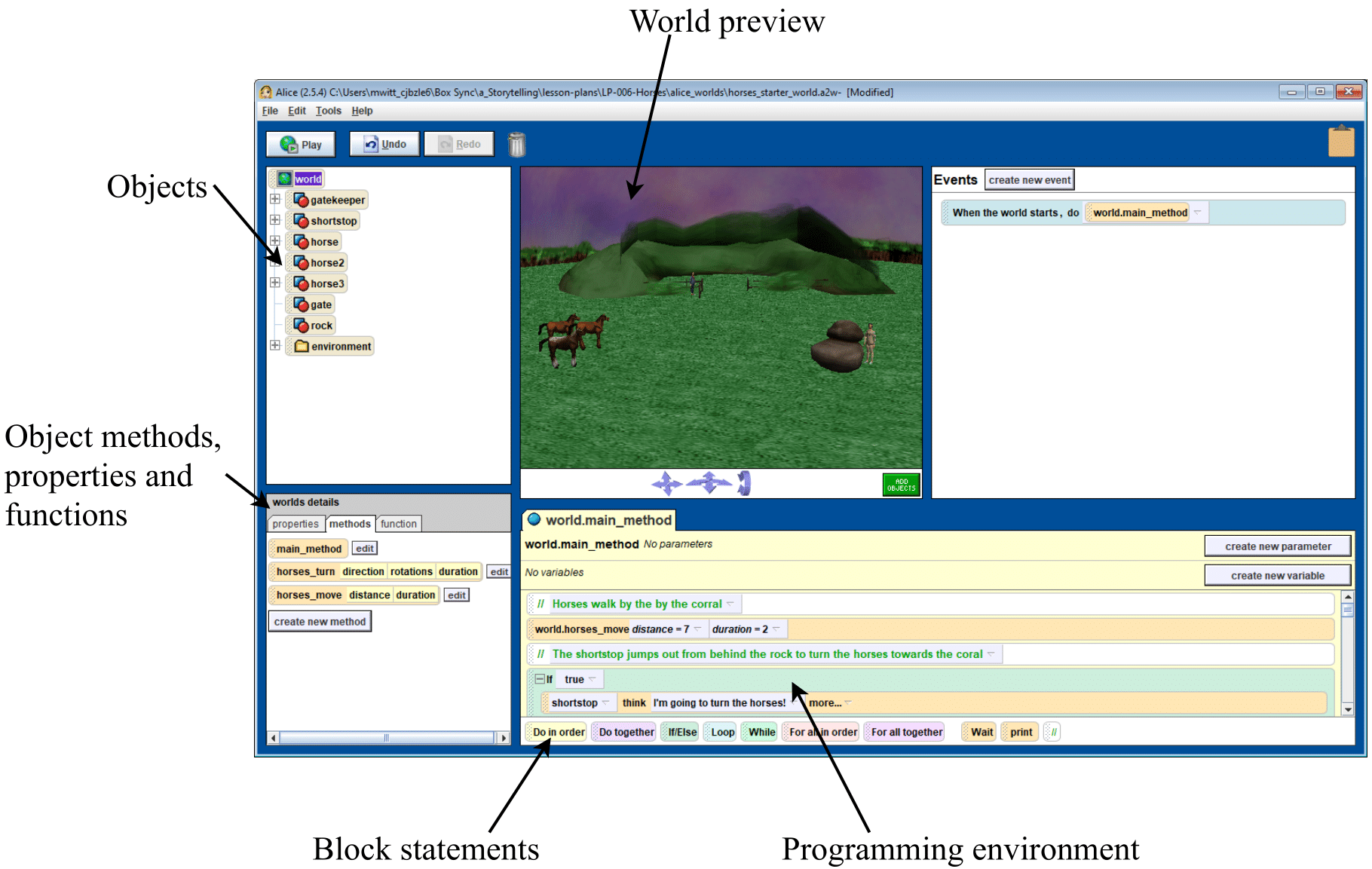
This figure shows an Alice environment for the Horses lesson plan, indicating all important
locations.
Alice Intro Course
In order to get an understanding of how Alice works as a program, we’ll go through a small
tutorial on how Alice works.
- Download Alice 2 onto your computer and open the program.
- Download the starter world intro-alice-starter. After
opening Alice, select the tab “Open a World” from the welcome screen and
navigate to where you saved the starter world.
For assistance, a worksheet describing the process of opening a
saved Alice world is available on the Storytelling lessons webpage Storytelling lessons
webpage.
This is a starter world made to understand the inner workings of Alice. It is made to be a
simpler starter world than any of the lesson plans. This should make it easy to understand
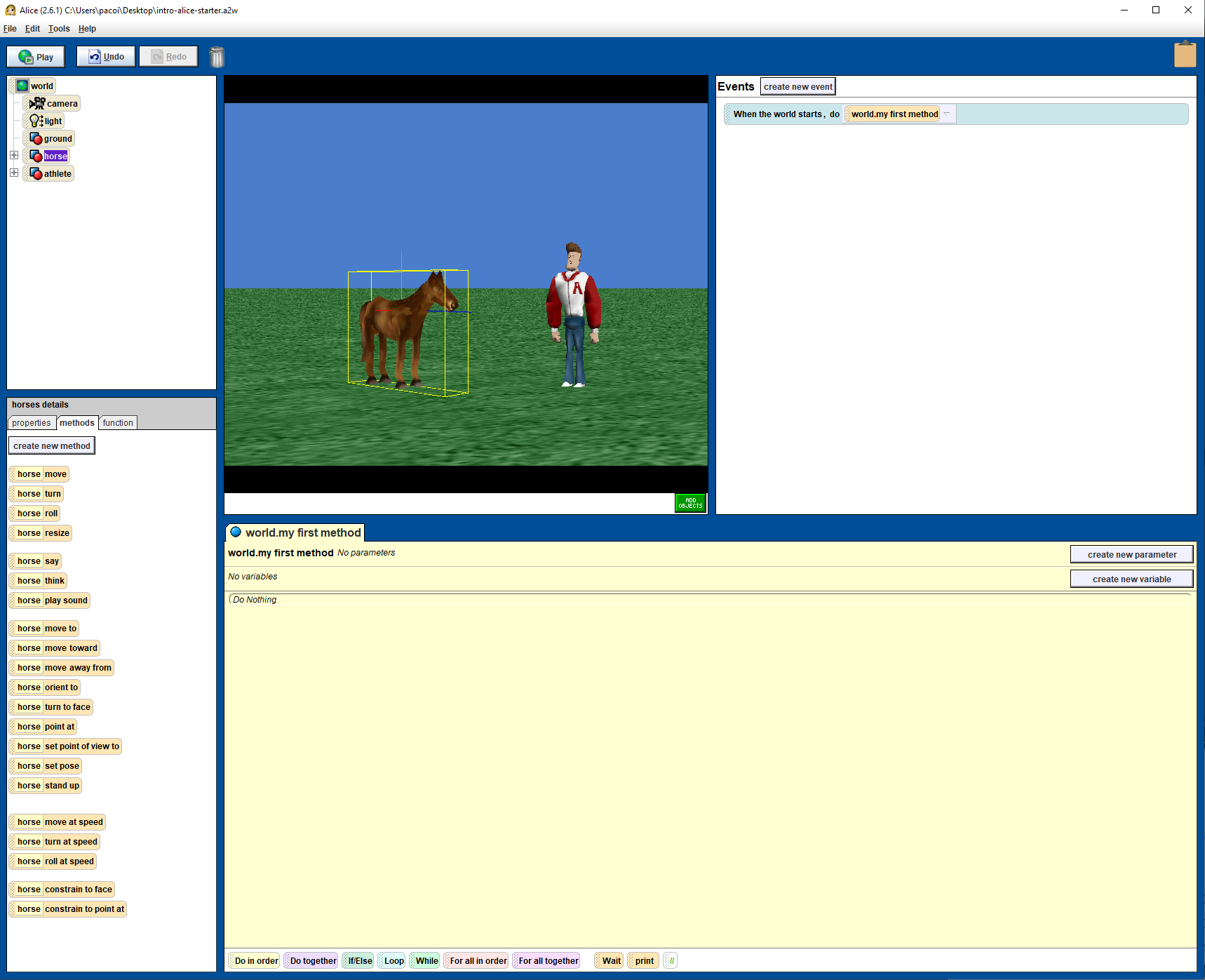
regardless of your previous experience. Currently, after opening the world, you should see an
Alice workspace similar to this image.
What you’ve just opened is called a starter world. We have multiple starter worlds for the
lesson plans showing what the conditions should look like at given stages. We give starter
worlds to students so that they don’t need to create an environment and understand the inner
workings of Alice to get an understanding of coding in general. We also do this to prevent
students from going completely off the lesson plan on their own. First we’d like to explore the
objects panel on the left, this panel shows the World, as well as everything in it, including:
- camera (This gives us something to see the animation from)
- light (This controls how the characters are seen)
- ground (This gives the objects something to stand on)
- the horse
- the athlete
The objects such as world, light, camera, and ground are not imperative to understand for the modules that you
may be teaching, however it may be worth understanding in case students ask questions. If
you are interested, there are some videos that explain it well on this playlist.
For now, draw your focus towards the athlete. If you select the name athlete on the left panel,
you should see him highlighted on the World Preview. You can also move your mouse to the
character himself and move him around, however this will not be imperative to teaching the
course.
The main way we’ll be moving characters around in Alice is by using the panel right
below the Object panel. This is where the methods, properties, and functions are stored for
each object. Notice how if you click on the horse, the Object methods change to be the
methods for the horse. Try grabbing one of the methods, and move it into your “world.my first
method” section. This is where all of our actionable commands will be stored! Once you’ve
decided what method to place, try playing your animation via the top left “Play” button. Spend
some time experimenting with different methods on each character. When you’re satisfied,
right click on the methods you placed in “world.my first method” to delete them. Keep this
world ready for CS Fundamentals, where we go more in depth on the Alice environment with
conditionals.
Journal
Throughout these modules, you should have a journal to take notes as you go through all the
modules. We have supplied an online journal for those that prefer to take notes online. Begin
your journal with “discussion 1” answers. You should also journal your hours as you go
through the modules, so that we can update our time estimates accordingly. Submit the journal
at the end of the proffesional development.
Discussion I
- What are your first impressions of Alice?
- What did you do in Alice?
- Could you see using this tool in your classroom?
- Any initial questions?
Resources
Alice Tutorials
Alice Intro Starter World
Storytelling lessons webpage.
Reading
Full Brochure
Short Reading